Designing for the Future of Drug Discovery
The NCATS ASPIRE Program (A Specialized Platform for Innovative Research Exploration) is an advanced research initiative at the National Center for Advancing Translational Sciences aimed at revolutionizing drug discovery, chemical synthesis, and translational science. It integrates AI, robotics, automation, and cheminformatics to accelerate the development of new therapies — overcoming the traditional inefficiencies of manual lab workflows.
The program consists of a suite of interconnected applications spanning three core areas: Inventory Management, an IoT Lab Dashboard (DashChem), and an AI-driven Chemistry Platform (AICP). Scientists and chemists move fluidly between these tools to plan, execute, and document their experiments — meaning cross-application consistency is critical.
"The success bar was direct: did it work for the scientists using it, or didn't it?"
Inventory Management
Automated tracking, check-in/out, and organization of lab materials across physical storage locations.
IoT Dashboard — DashChem
Remote scheduling and control of scientific instruments, with real-time workflow execution and data capture.
AICP — Synthetic Target Production
AI-driven tools for designing and preparing synthetic targets, integrating computational predictions with experimental execution.
Sole Designer, Full Suite
UX/UI Design Lead — Axle Informatics in support of NCATS ASPIRE
I was the only designer on this engagement, responsible for all UX and UI work across the ASPIRE application suite. I worked closely with an NIH Research Scientist who provided the initial project briefs and served as the primary reviewer — validating designs and prototypes against the real-world needs of the lab. My work spanned from early information architecture and user flows through high-fidelity interactive prototypes delivered to NIH's development teams.
Responsibilities
- Information Architecture & Flow Mapping — Defined user journeys and system flows for five distinct application modules, mapping the paths scientists take from authentication through task completion.
- Interactive Prototyping in Adobe XD — Created fully interactive, high-fidelity prototypes for each module. These prototypes served as the primary vehicle for gathering feedback from NIH scientists and driving development decisions.
- GUI Testing & UI Audit — Conducted structured evaluation of existing screens across DashChem and ASPIRE Inventory, identifying inconsistencies in navigation patterns, component styles, and layout behavior.
- UI Recommendations & Updates — Produced annotated design recommendations and updated UI proposals implemented by engineering teams to improve cross-application cohesion.
- Competitive Analysis — Researched industry-standard tools (ChemDoodle, PubChem, CDD Vault, JME) to inform the design of ASPIRE's molecule sketcher and reaction setup interfaces.
- Stakeholder Reviews — Presented designs in regular check-ins with the BA and project management team, iterating based on feedback from NIH scientists and chemists who were the direct end users.
From Rough Outlines to Interactive Reality
The design process on ASPIRE was deliberately lean and iterative. Rather than beginning with formal specifications or detailed requirement documents, each module started with a rough PowerPoint outline from project stakeholders — a sketch of needs and intent. From there, it was my job to translate that outline into a complete user experience.
Fully interactive prototypes were the cornerstone of the process. For a user base of working scientists and chemists — people who know exactly what they need but may not speak in UX terms — putting a real, clickable interface in front of them was far more valuable than static wireframes or documentation. Prototypes surfaced friction early, generated concrete feedback, and gave development teams a clear, unambiguous target to build toward.
"Instead of starting with detailed specifications, the process begins with rough PowerPoints outlining the needs for each project — which we then expand upon to develop a comprehensive user experience."
Project Kickoff & Architecture
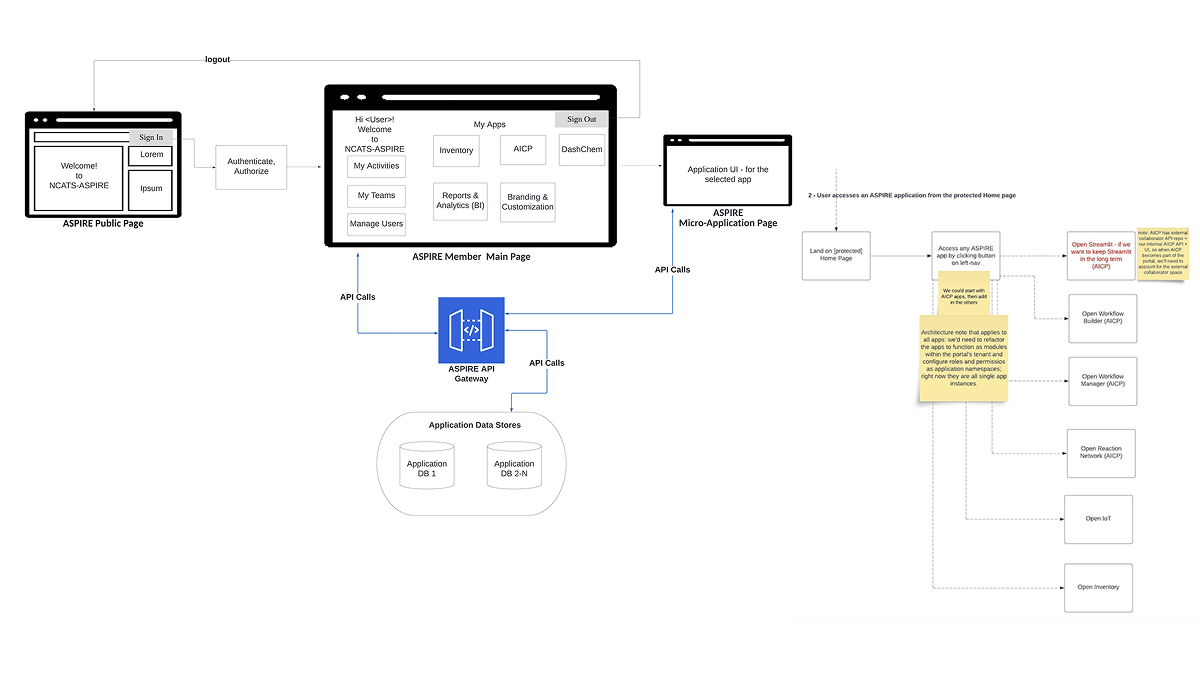
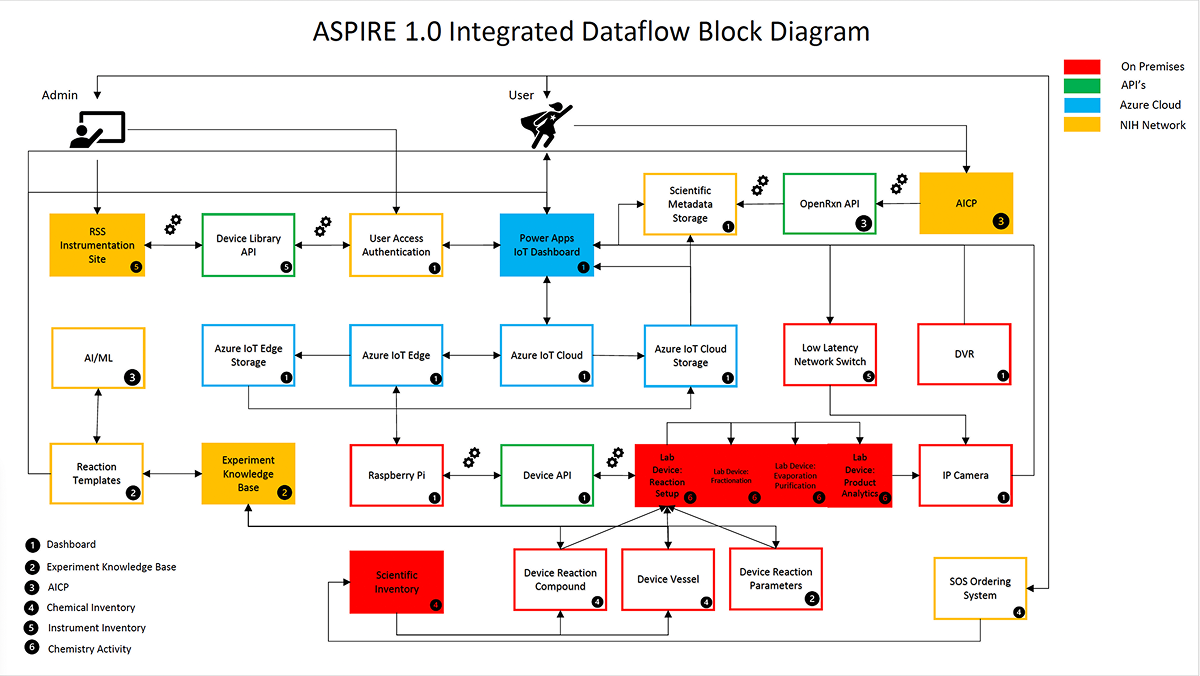
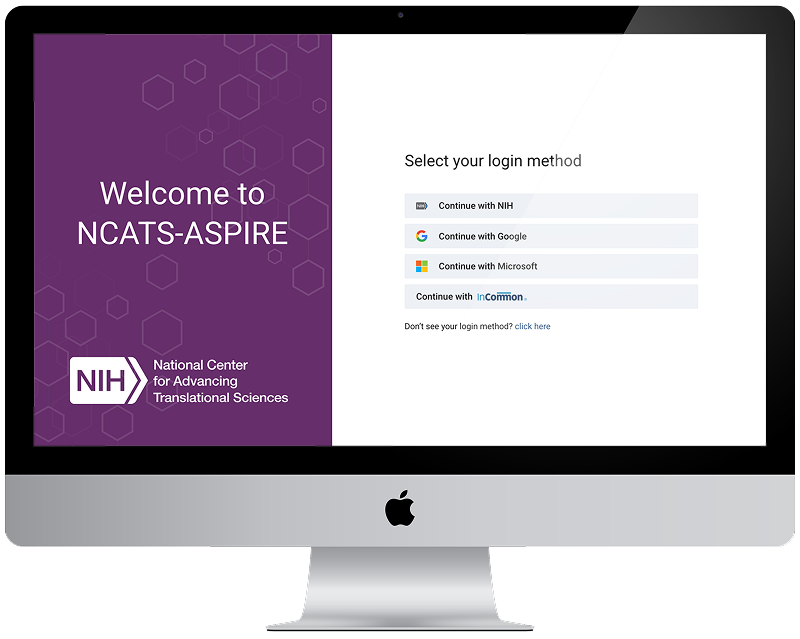
Onboarded to the ASPIRE ecosystem. Established the information architecture for the portal, mapped authentication and application access flows, and developed the ASPIRE 1.0 integrated dataflow diagrams.
GUI Testing & UI Audit
Conducted a structured audit across DashChem and ASPIRE Inventory, identifying inconsistencies in navigation, component styles, button treatments, layout heights, and breadcrumb patterns. Produced annotated findings across 4 audit slides delivered to the engineering team.
Activity Logger & RXN Registration
Designed the Activity Logger app from problem definition through interactive prototype. In parallel, began RXN Registration — including competitive analysis of molecule sketcher tools to establish design standards for the chemical sketch interface.
Biotage V10 Setup & SPE Instruments
Designed the DashChem interface modules for the Biotage V-10 evaporation system and the Solid Phase Extraction (SPE) instrument workflows — balancing technical precision with clarity for chemists performing semi-automated purification tasks.
UI Updates, Refinement & Handoff
Incorporated rounds of stakeholder feedback, applied UI updates across the suite for greater cohesion, and finalized design documentation for development handoff.
System Architecture & Flow Mapping
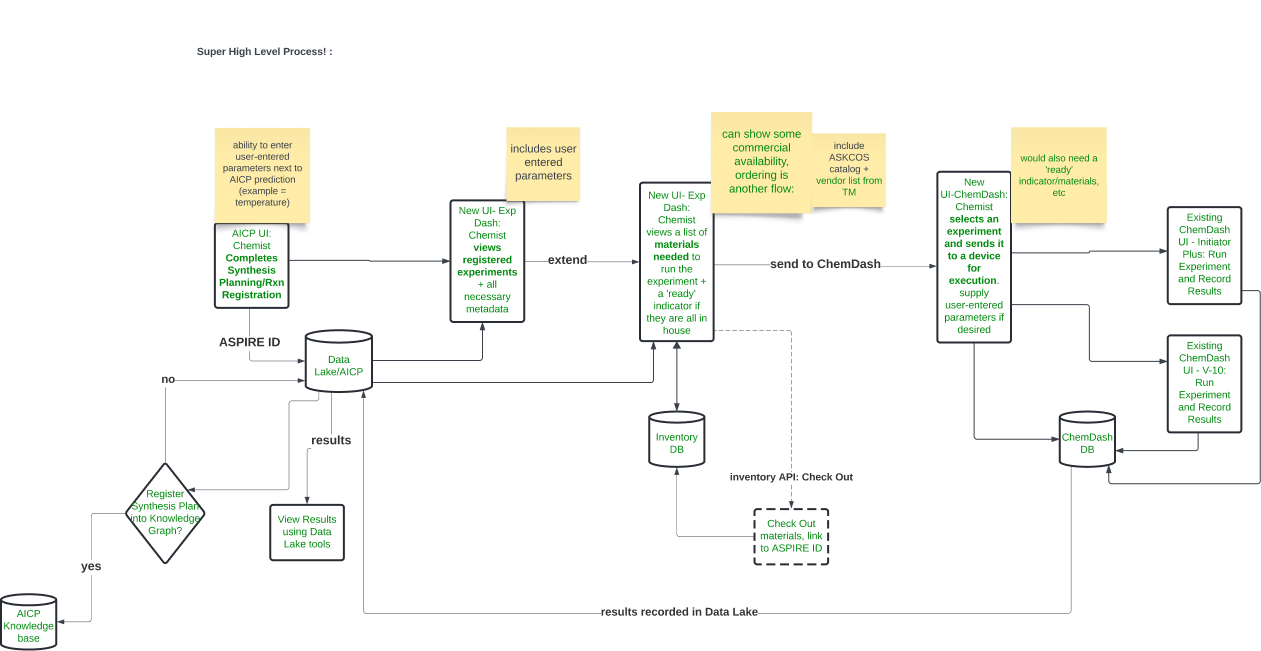
Early in the engagement, I developed flow diagrams mapping how users authenticate, access applications, and navigate between modules within the ASPIRE portal — as well as the underlying dataflow architecture connecting on-premises lab devices, NIH network systems, Azure cloud infrastructure, and third-party APIs.
Finding the Gaps in a Fragmented Suite
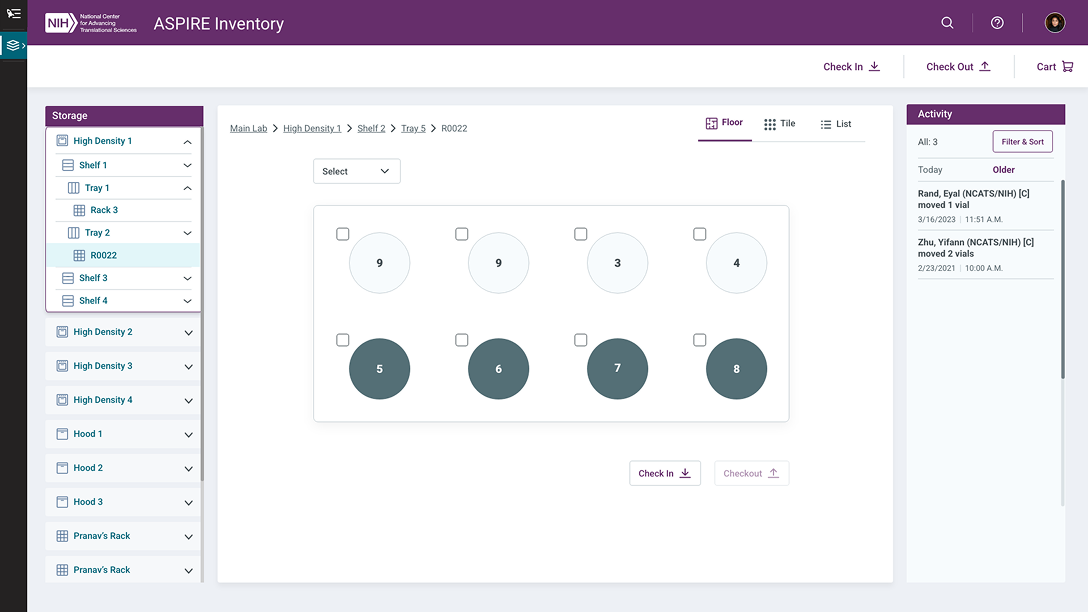
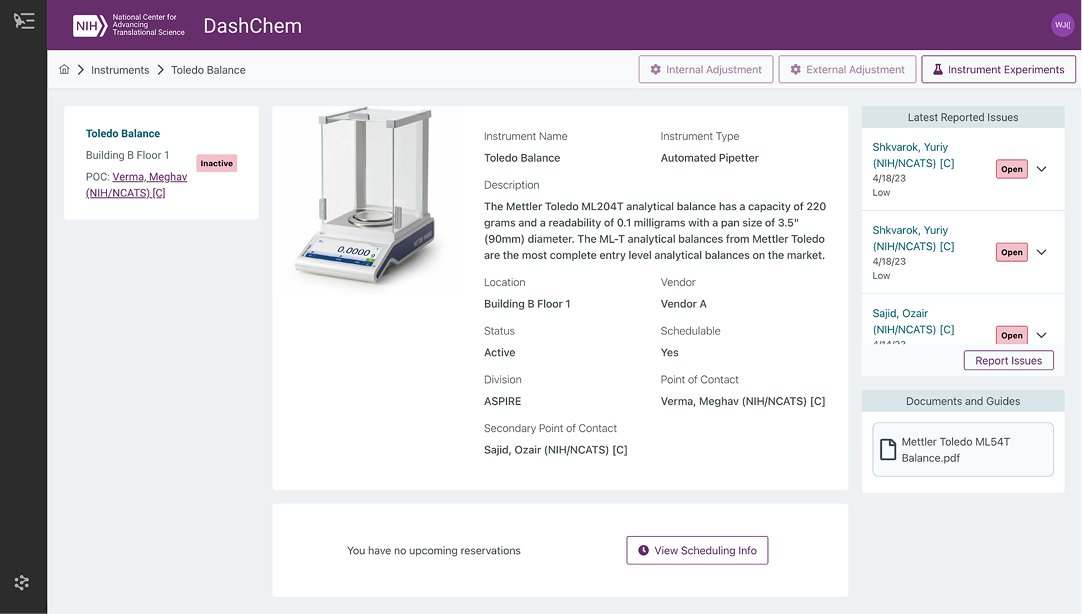
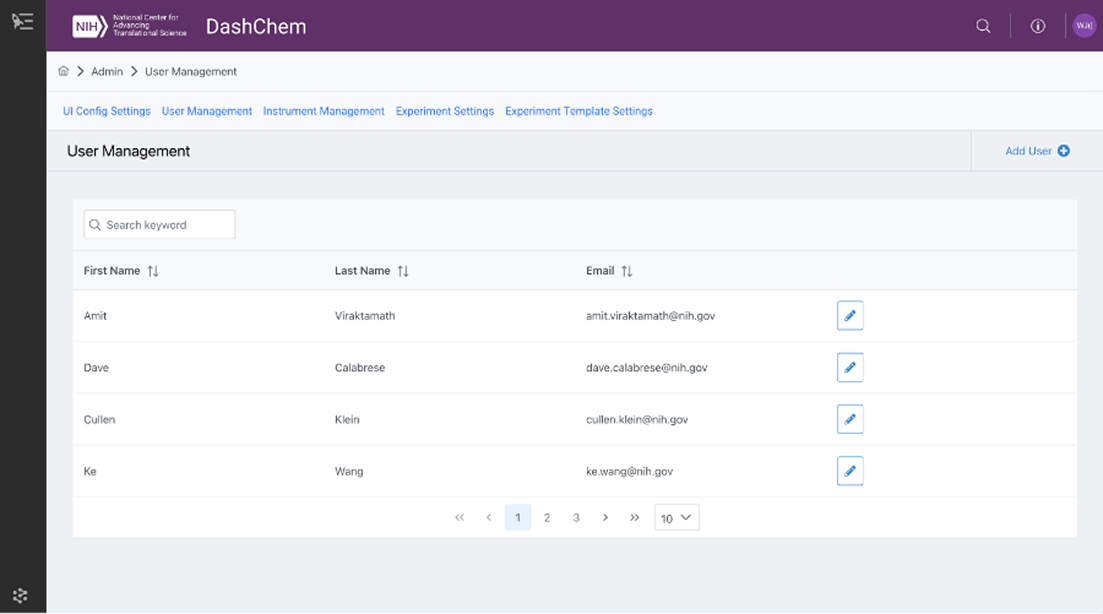
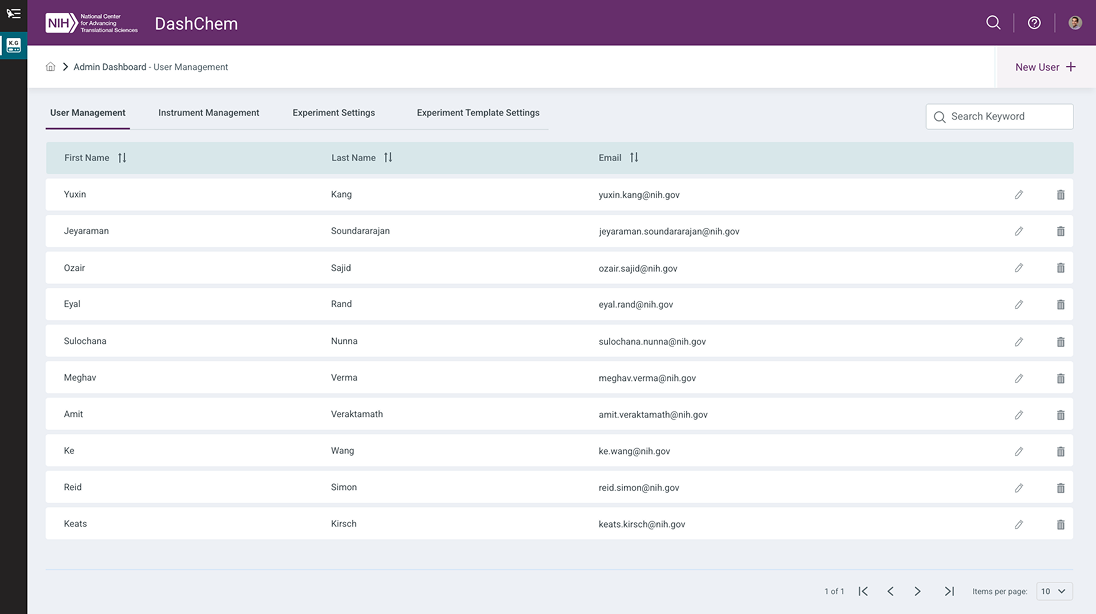
While working across the ASPIRE application suite, it became clear that the applications — DashChem and ASPIRE Inventory in particular — had grown organically without a unified design standard. Subtle and not-so-subtle inconsistencies had accumulated: mismatched navigation patterns, differing button styles, inconsistent layout heights, and varying component treatments that created friction for users moving between tools.
I conducted a structured GUI test and UI audit comparing screens side-by-side across applications, cataloguing the discrepancies and producing recommendations that were subsequently implemented by the engineering team.
Audit Findings — 4 Areas
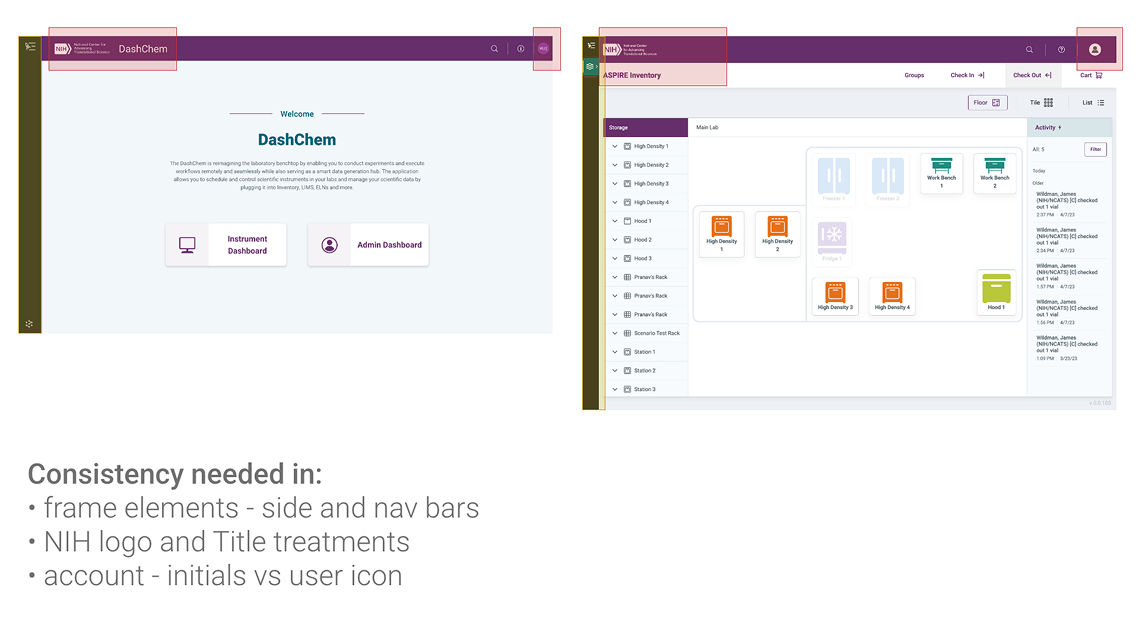
Frame & Navigation
Inconsistent side and nav bar styles across DashChem and ASPIRE Inventory. NIH logo and title treatments varied between apps. Account indicators used both initials and user icons without a consistent pattern.
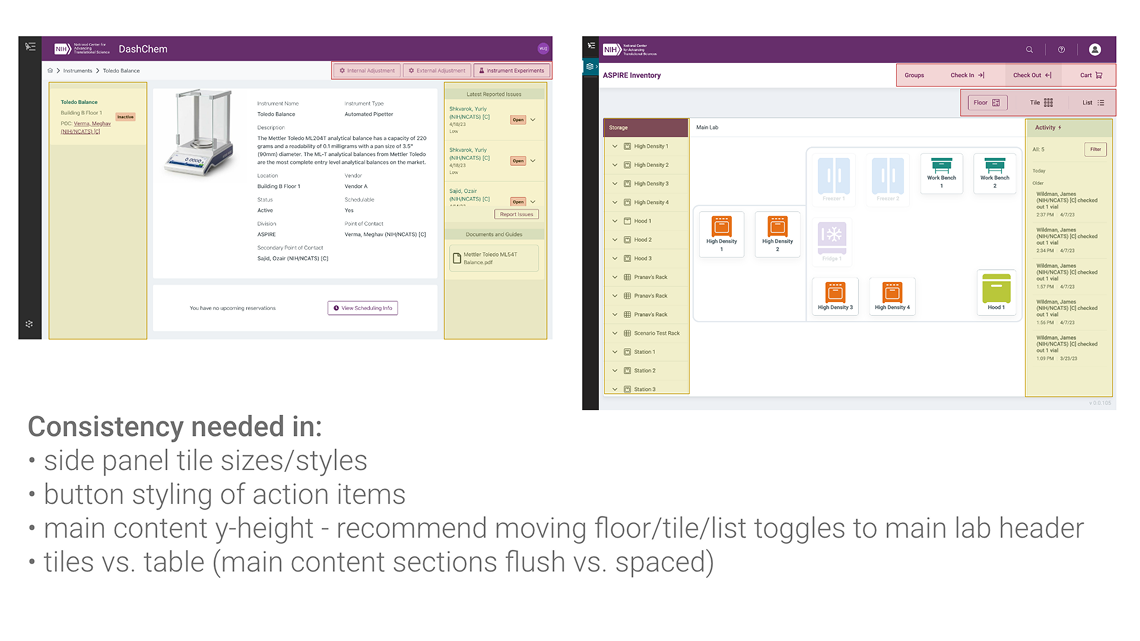
Component Styles
Side panel tile sizes and styles differed between applications. Button styling for action items was inconsistent, with varying visual weight and placement relative to content.
Layout & Content Zones
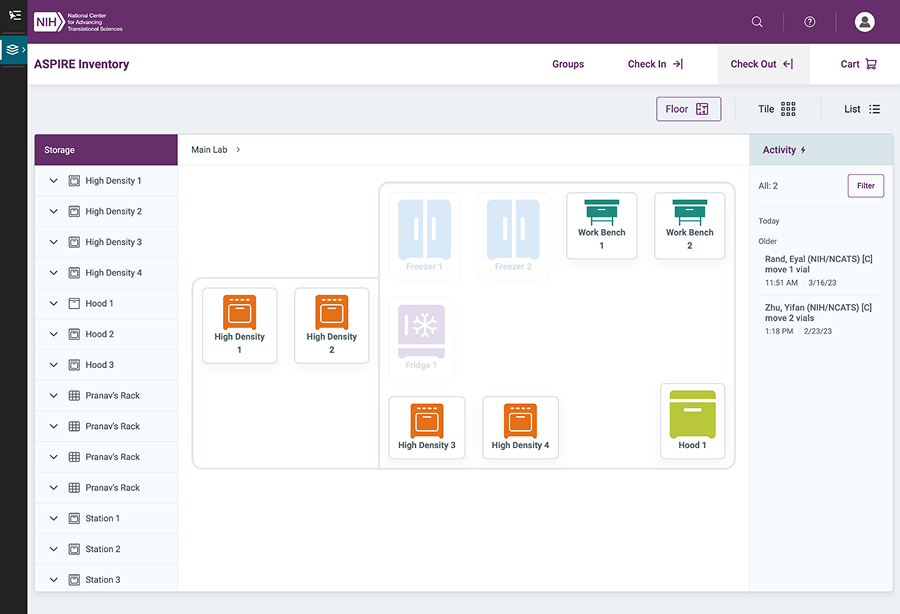
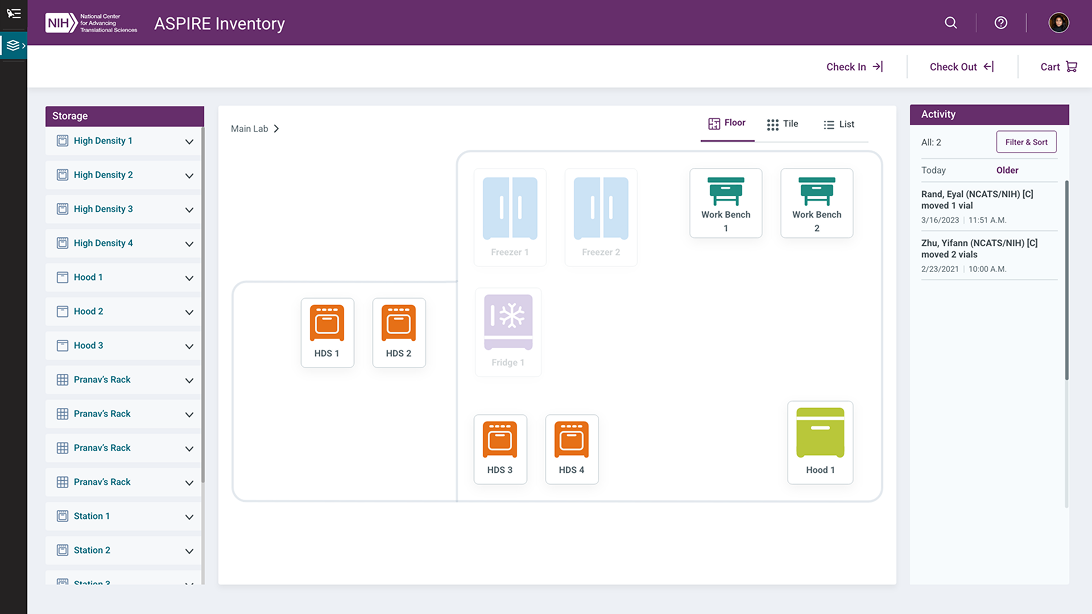
Main content Y-height was inconsistent, particularly between list and tile views. Recommended moving floor/tile/list toggles to the main lab content header for clearer spatial organization.
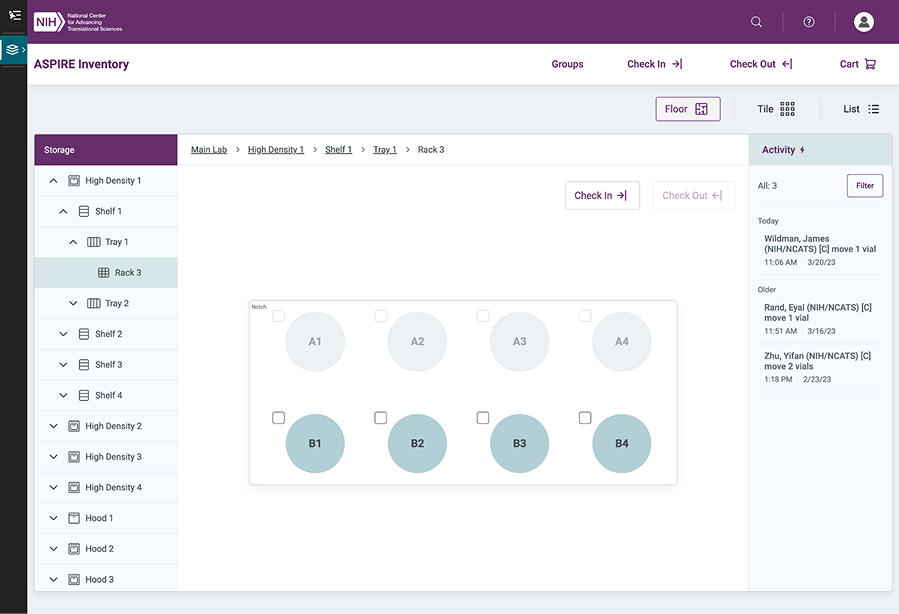
Breadcrumbs & Hierarchy
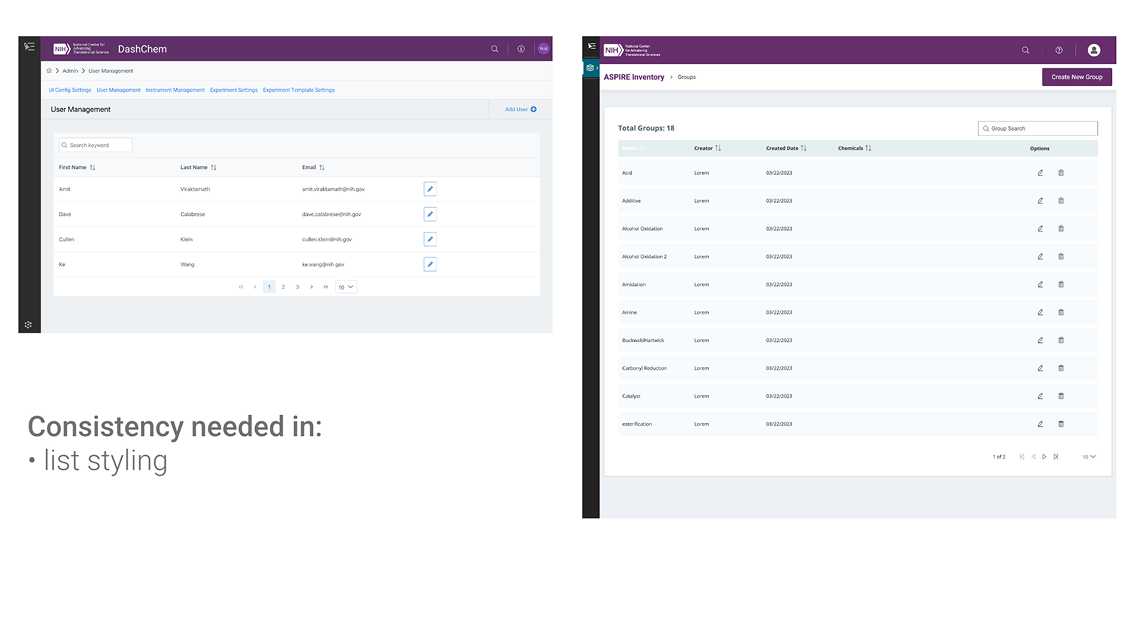
Breadcrumb placement was inconsistent across drill-down views. Section heading size and style varied. List styling within tables needed standardization for scan-ability.
Before / After — Cross-Application Comparison
The audit examined DashChem (instrument management) alongside ASPIRE Inventory (chemical storage), which scientists used in tandem. The visual inconsistencies were significant enough to disrupt the sense of a unified product.

UI Updates
Following the audit, I produced UI update recommendations addressing each finding. These were reviewed with the BA and engineering team and incorporated into the living design system for the ASPIRE suite. The result was a measurably more cohesive experience for scientists navigating between applications to accomplish their research goals.

Designing Four Tools, End to End
Each of the four modules within the ASPIRE suite addressed a distinct workflow in the research lab. Below is a breakdown of the design work for each — from problem framing through prototype delivery.
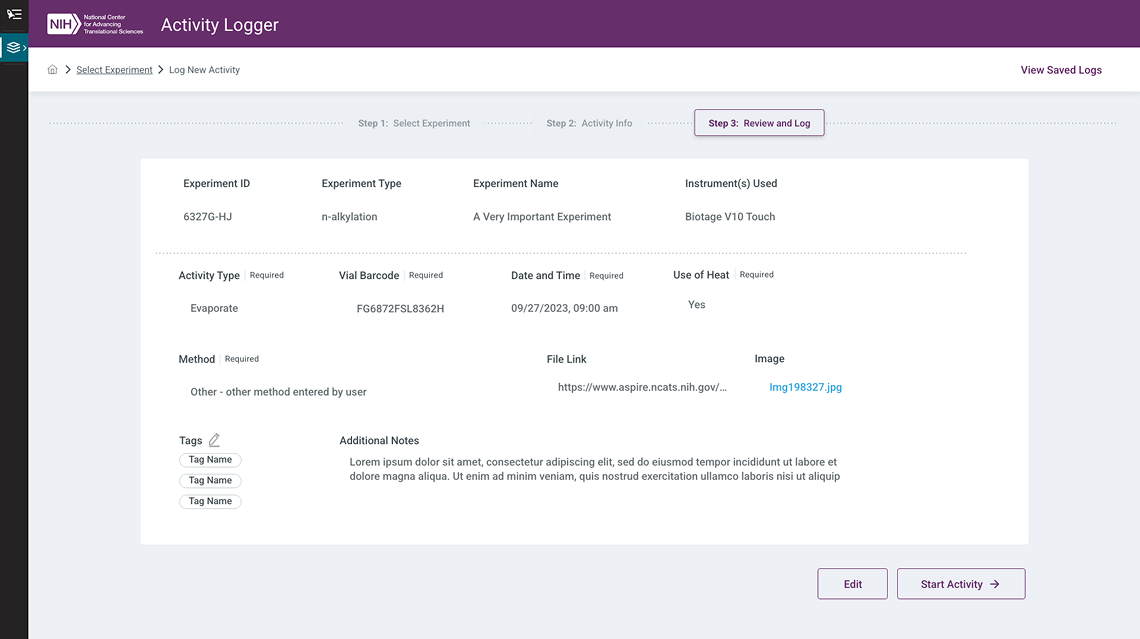
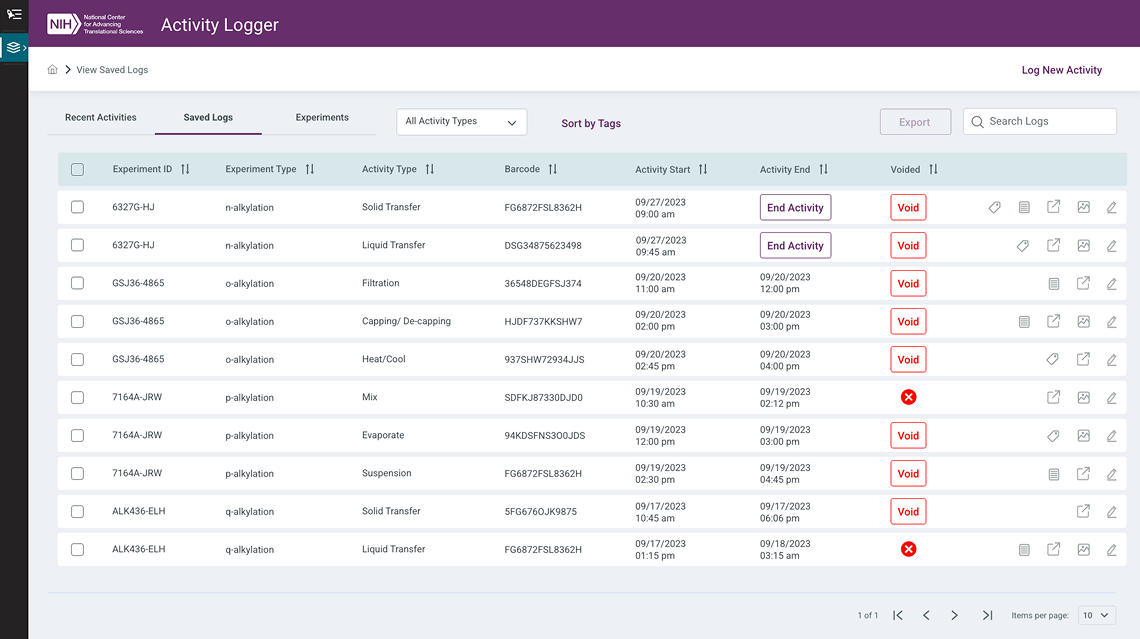
Researchers at NCATS had been managing experimental data through manual, error-prone processes — leading to inefficiencies and inaccuracies in research documentation. The Activity Logger was designed to replace these fragmented workflows with a robust, automated platform for accurate, easy-to-manage lab data handling within ASPIRE.
Problem Statement
Manual Data Entry
Time-consuming and error-prone — researchers needed automation and simplified input processes to reduce human error in experiment logs.
Data Integrity
Reliability of data recorded in electronic lab notebooks (ELNs) was inconsistent, with no safeguards against incomplete or inaccurate entries.
Retrieval & Tracking
No efficient mechanism existed for managing, searching, or tracking experiment logs across ongoing research activities.
Design Approach
The design centered on autofill, predefined templates, and streamlined data input patterns to reduce cognitive load and time-on-task. An intuitive flow guided researchers from session initiation through data entry and log submission, with validation and template selection built directly into the primary workflow.
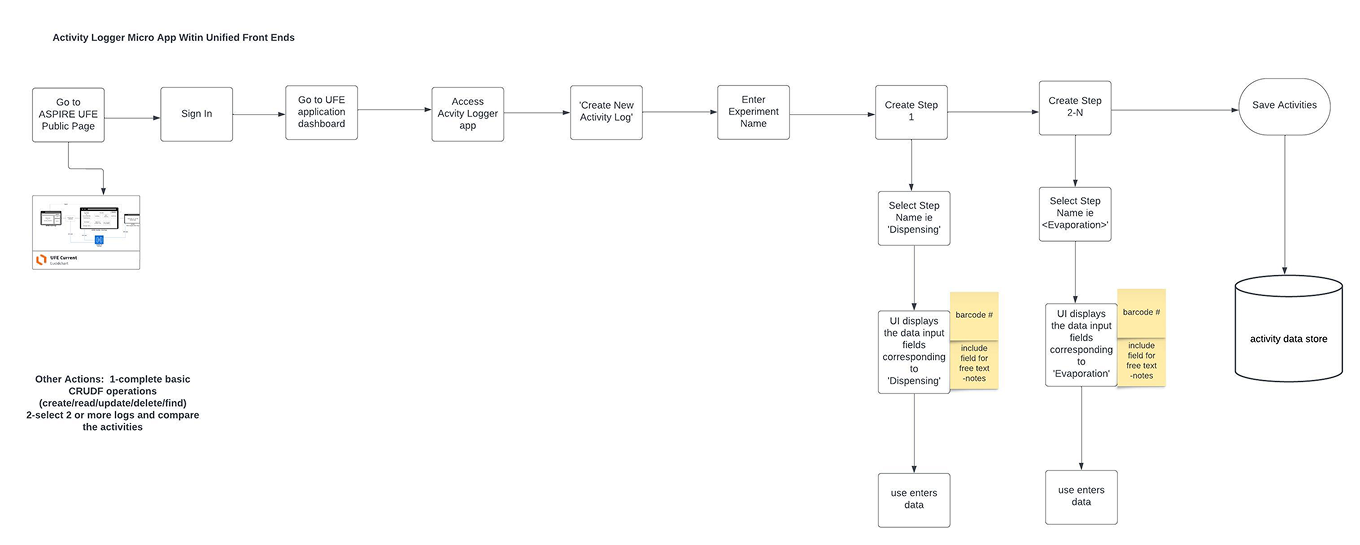
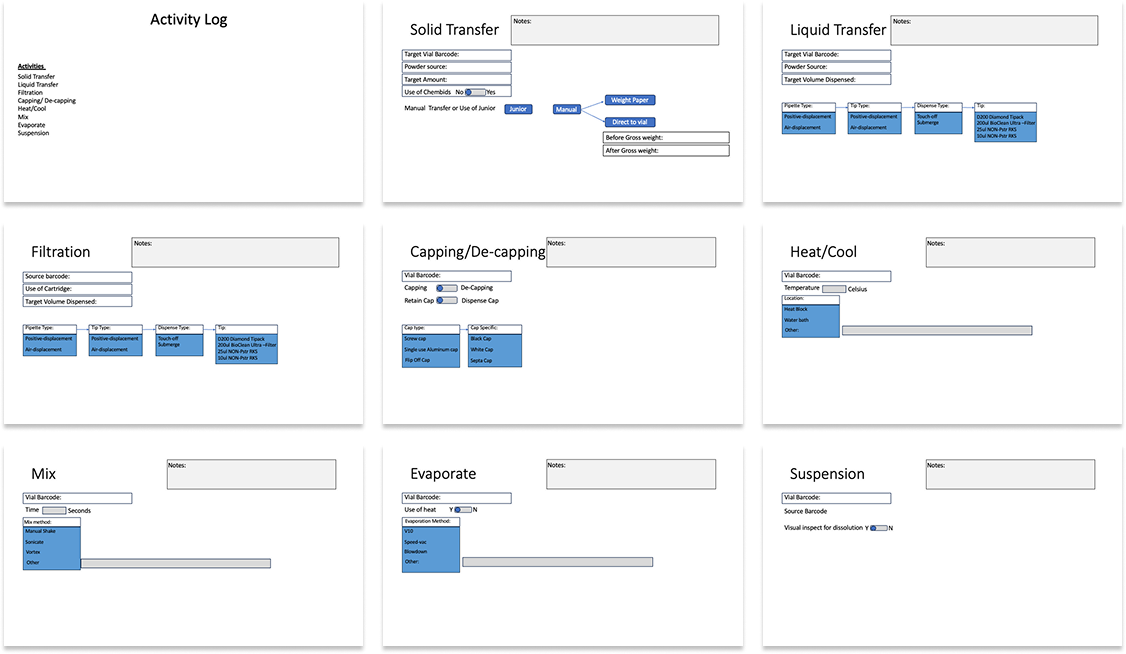
Screens
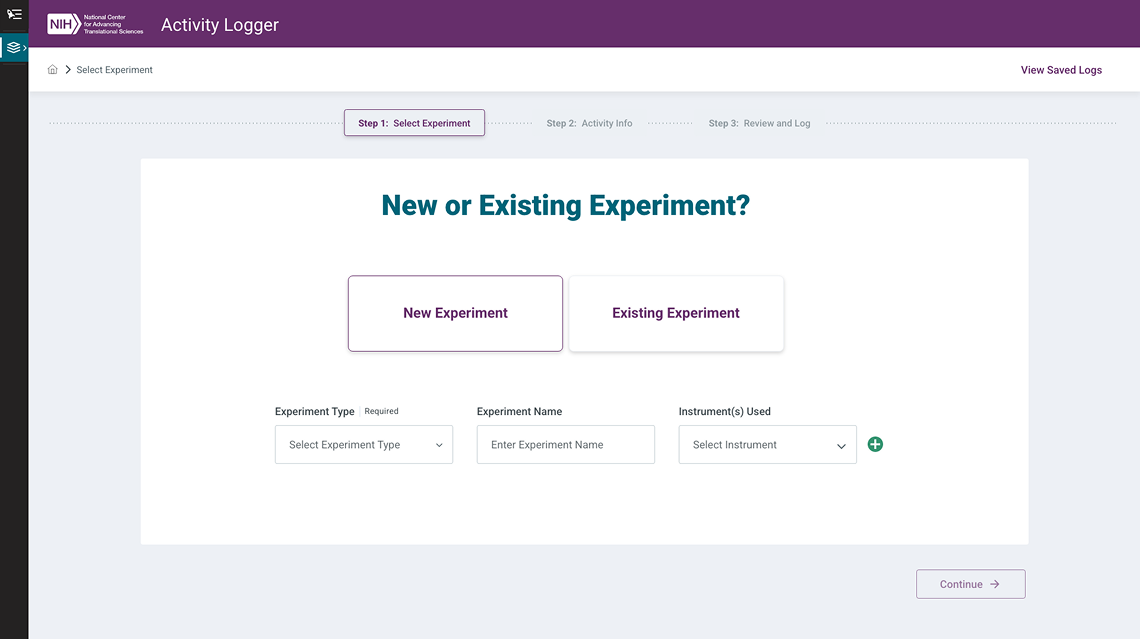
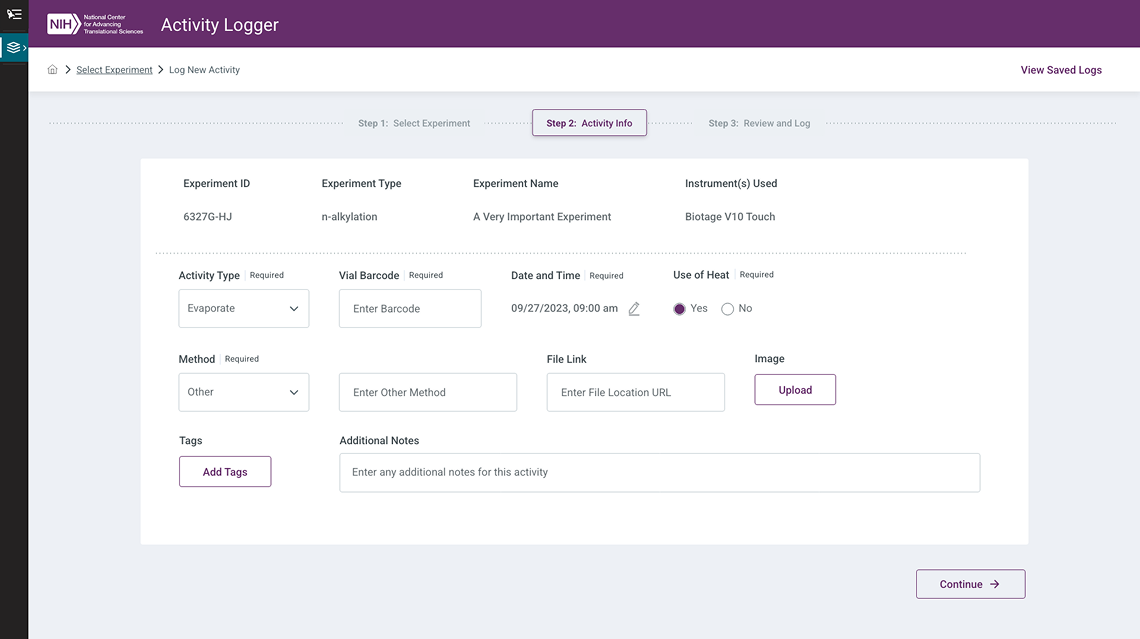
Interactive Prototype
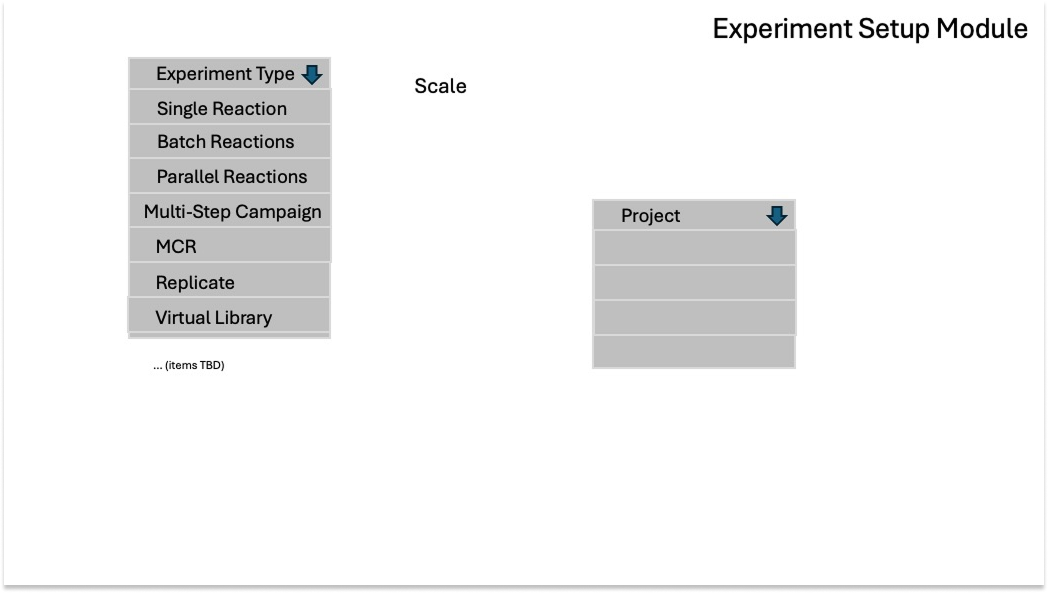
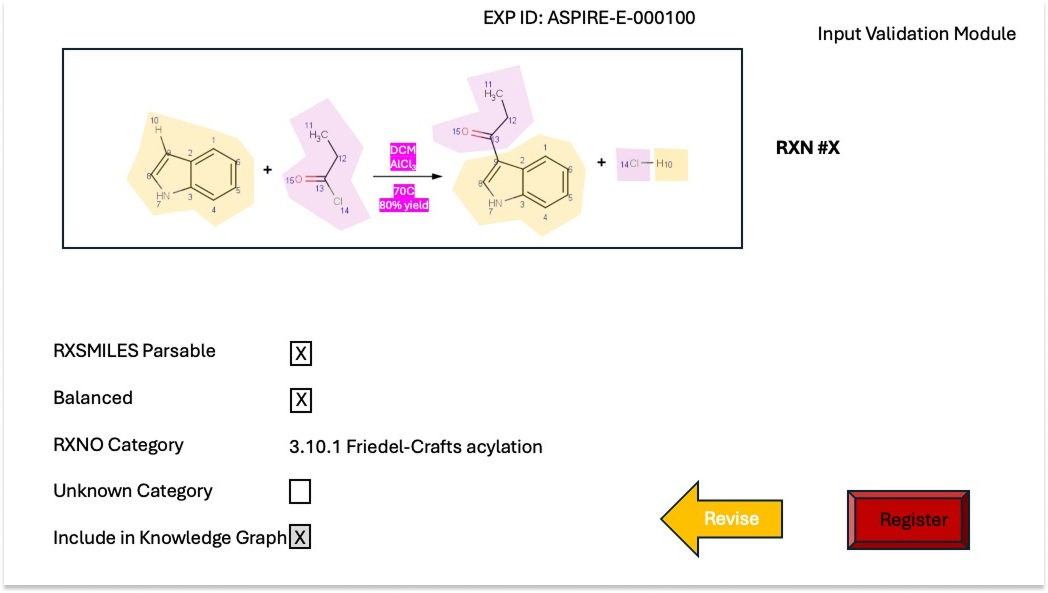
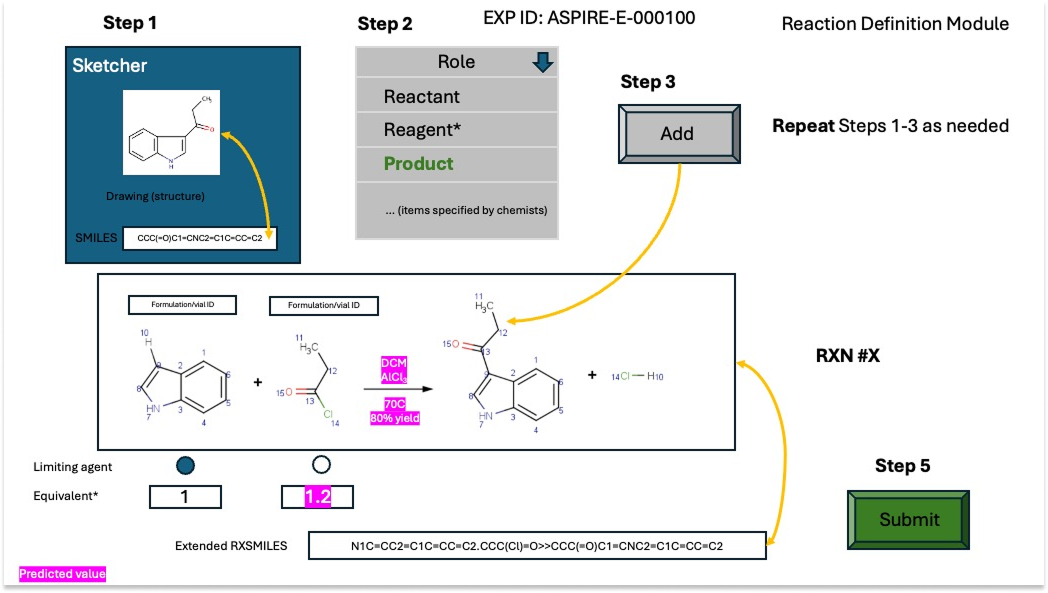
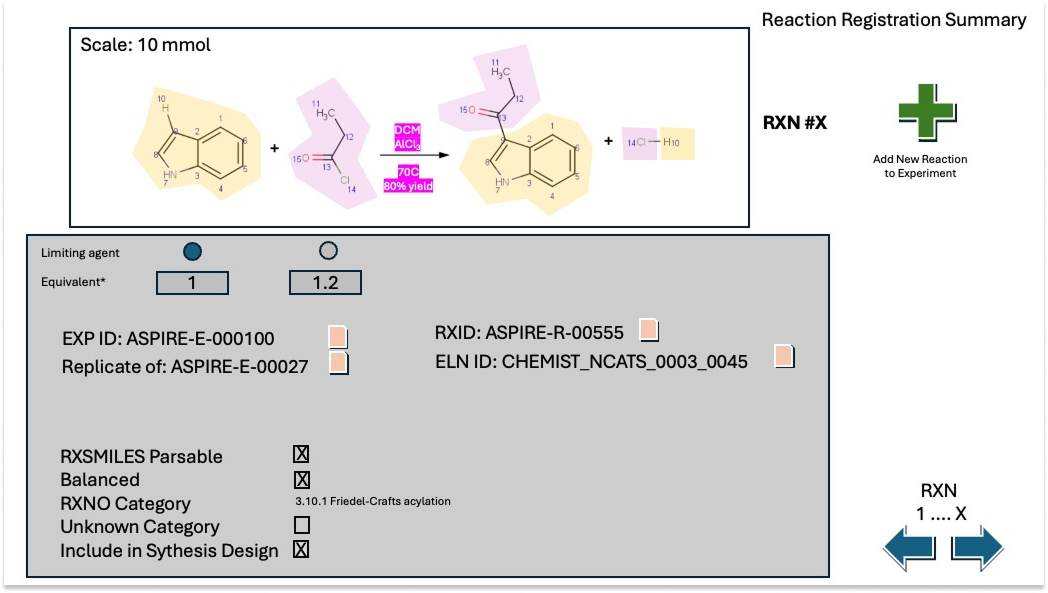
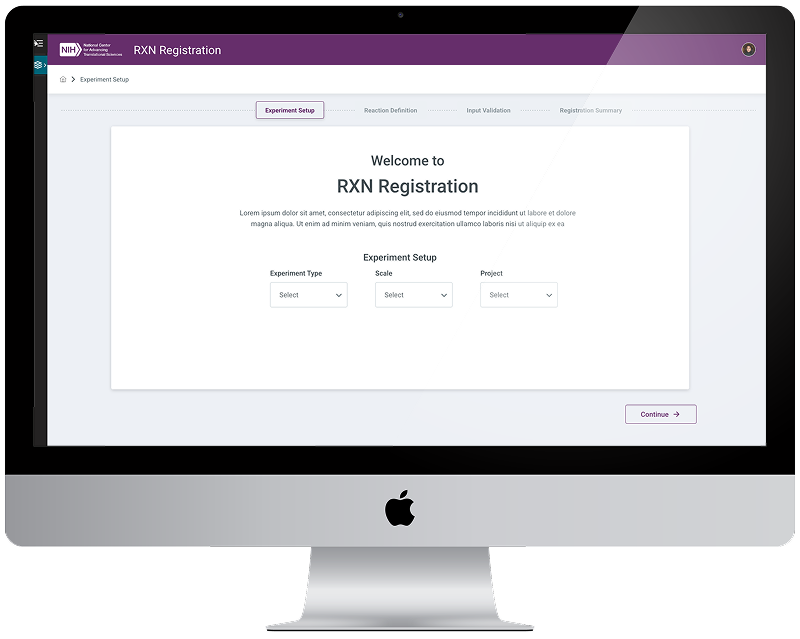
The Reaction Registration tool is a strategic component within ASPIRE aimed at streamlining the management and documentation of chemical reactions for R&D. It allows chemists to define reactants, products, and conditions through an intuitive interface — integrating predictive algorithms and a molecule sketcher to improve accuracy and reduce errors in planning and executing experiments.
Core Problems Addressed
- Data Entry Efficiency — Streamlining the process of entering and managing complex chemical reaction data, reducing manual effort and time consumption for researchers.
- Predictive Accuracy — Integrating predictive algorithms to assess reaction feasibility before execution, helping to avoid unsuccessful experiments and optimize resource use.
- Centralized Access — Providing a unified platform for registering reactions, simplifying information access and improving researcher collaboration.
- Real-Time Validation — Ensuring registered reactions are achievable based on current inventory and lab capabilities, preventing delays in the experimental workflow.
Competitive Analysis — Molecule Sketcher
A key component of RXN Registration is the molecule sketcher — a tool allowing scientists to sketch out compounds for reaction setup. I conducted a competitive analysis across industry-standard tools to ensure ASPIRE's implementation aligned with established scientific UX conventions.
ChemDoodle
Evaluated for element toolbar layout, bond drawing patterns, and template management — a benchmark for professional chemical drawing interfaces.
PubChem Editor
Reviewed SMILES/InChI input conventions, search integration, and coordinate export formats used in academic research contexts.
CDD Vault
Assessed R-group management, substitution point patterns, and template library UX patterns from a pharmaceutical research perspective.

Source Documents
Screens
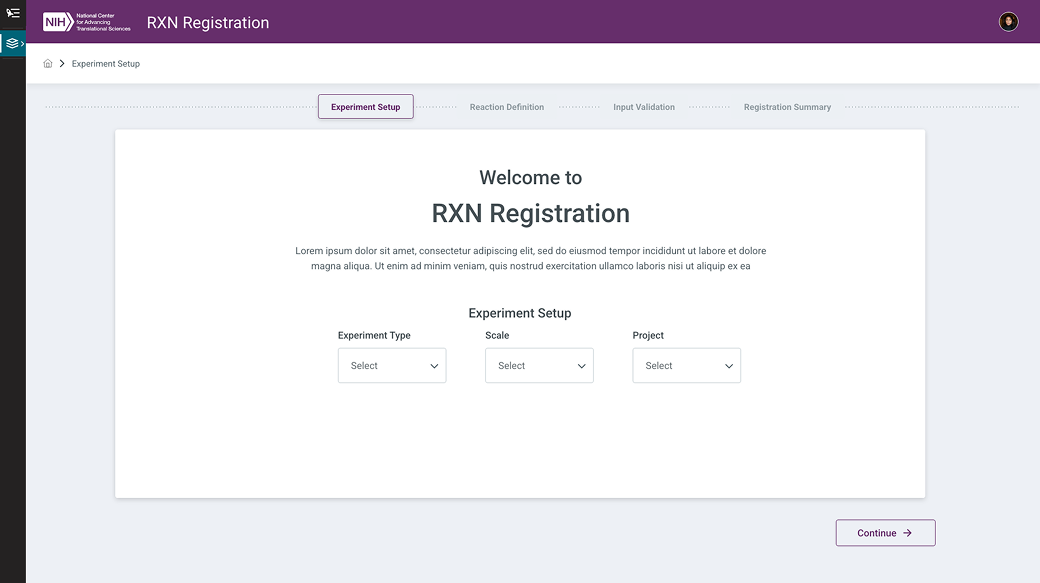

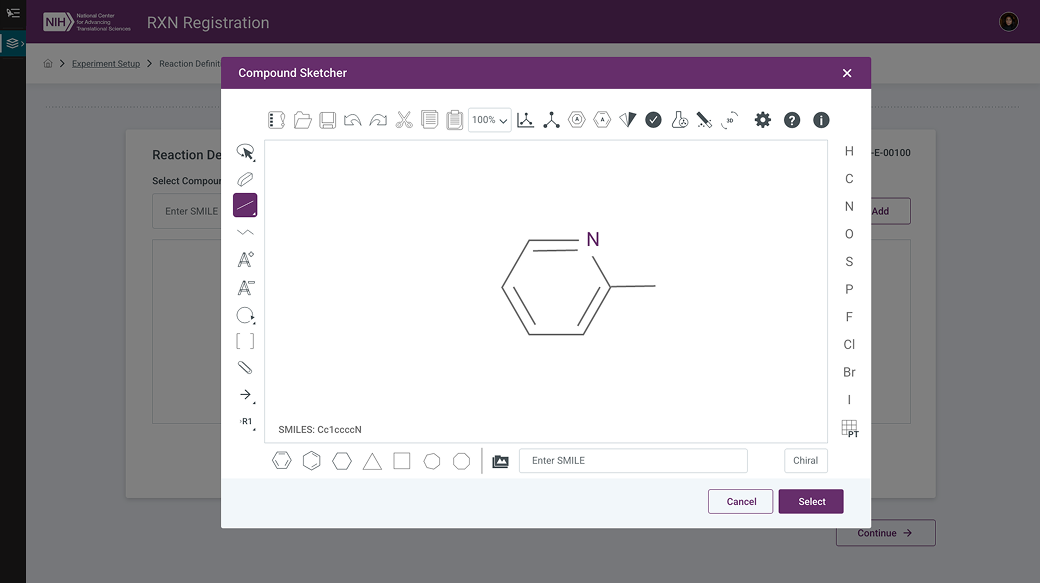

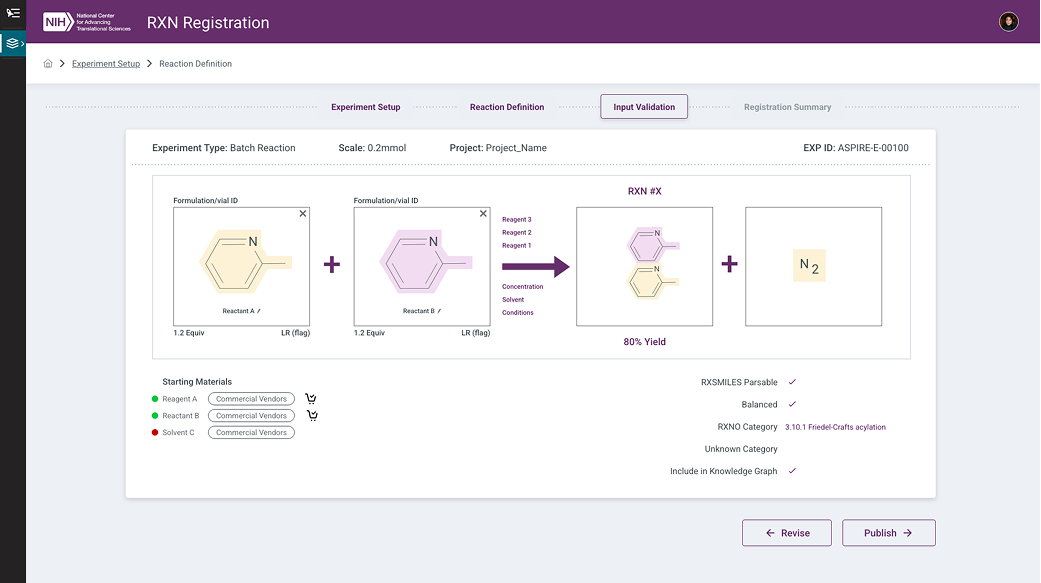
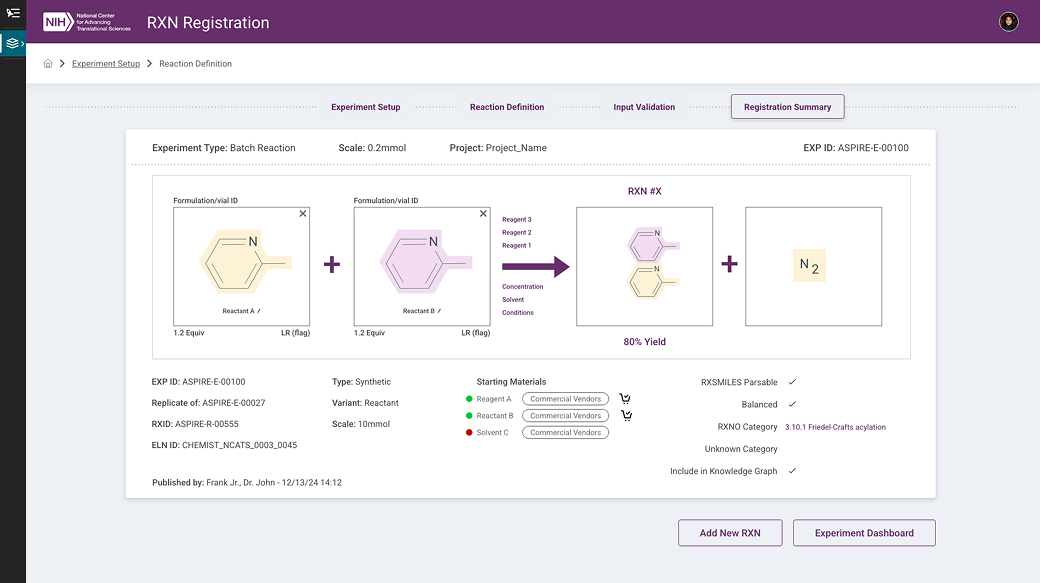
Interactive Prototype
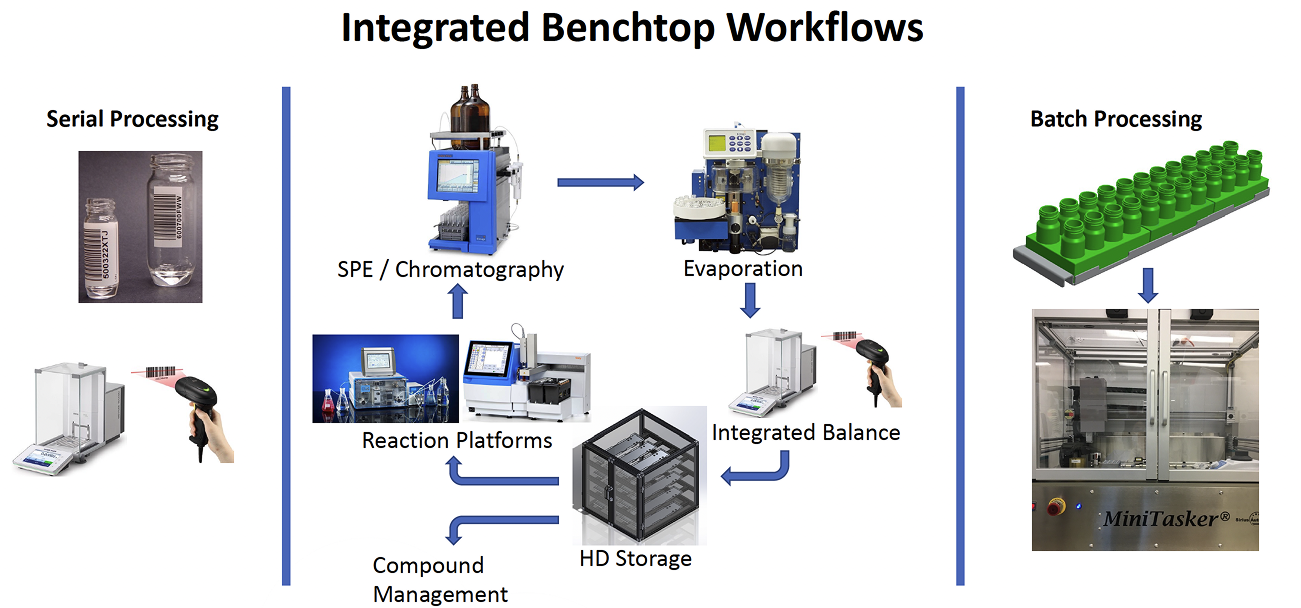
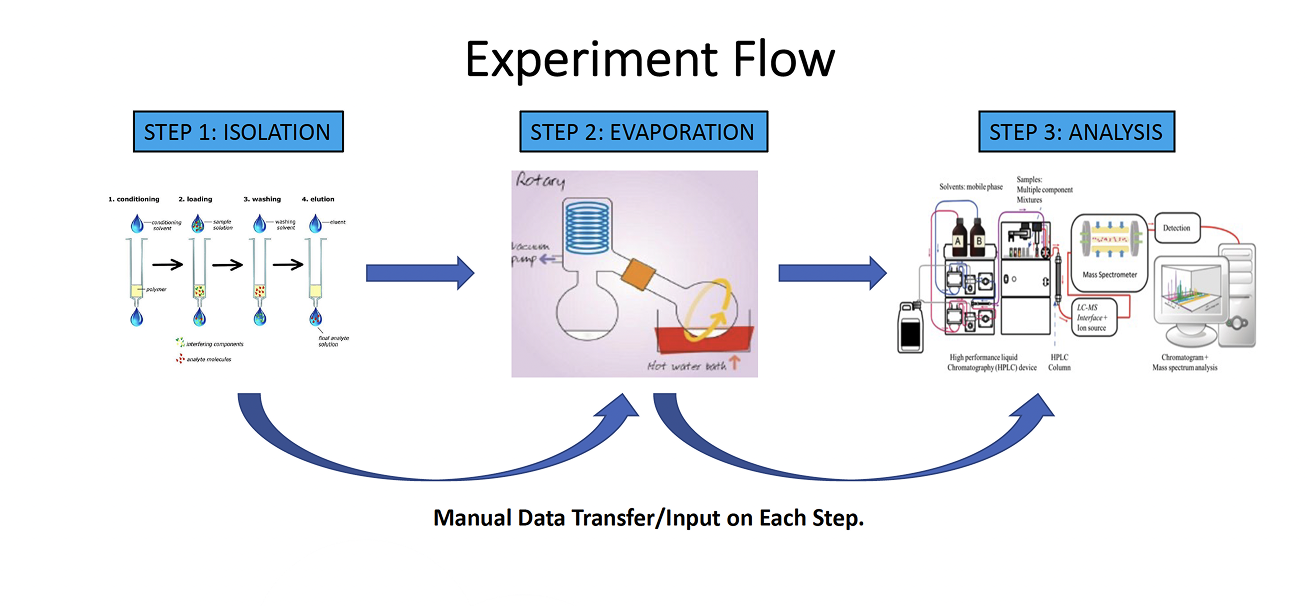
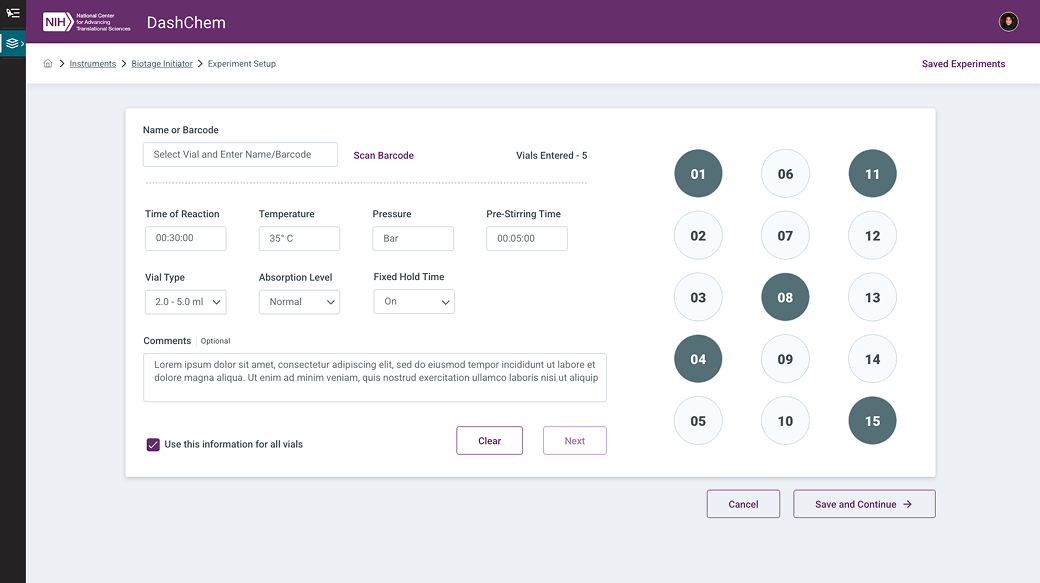
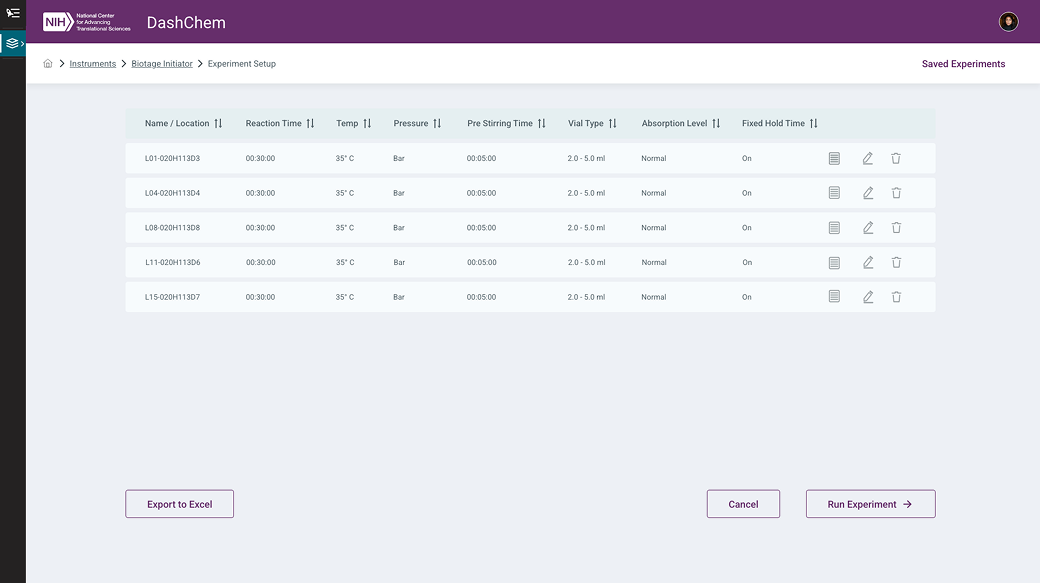
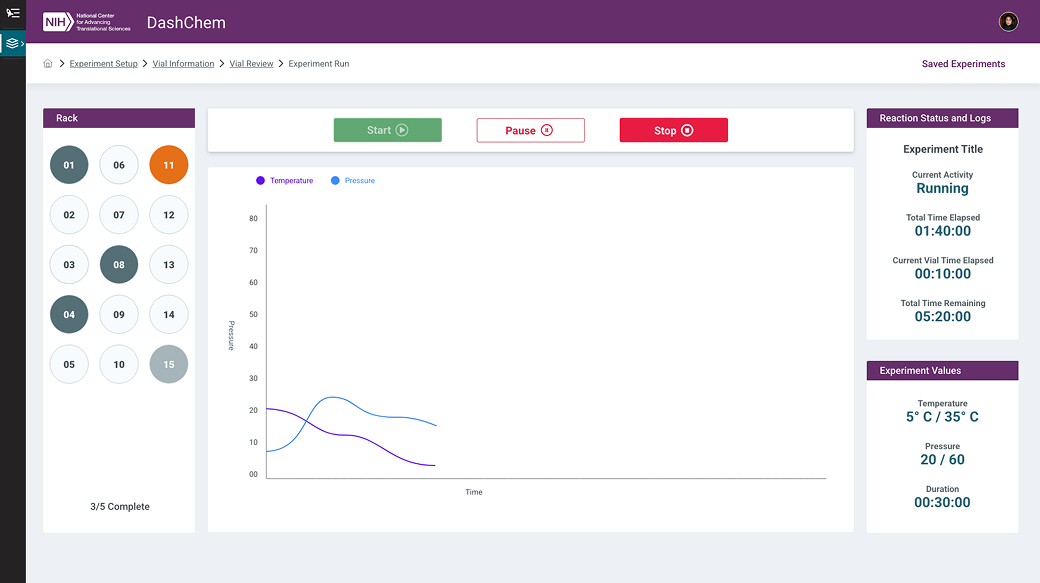
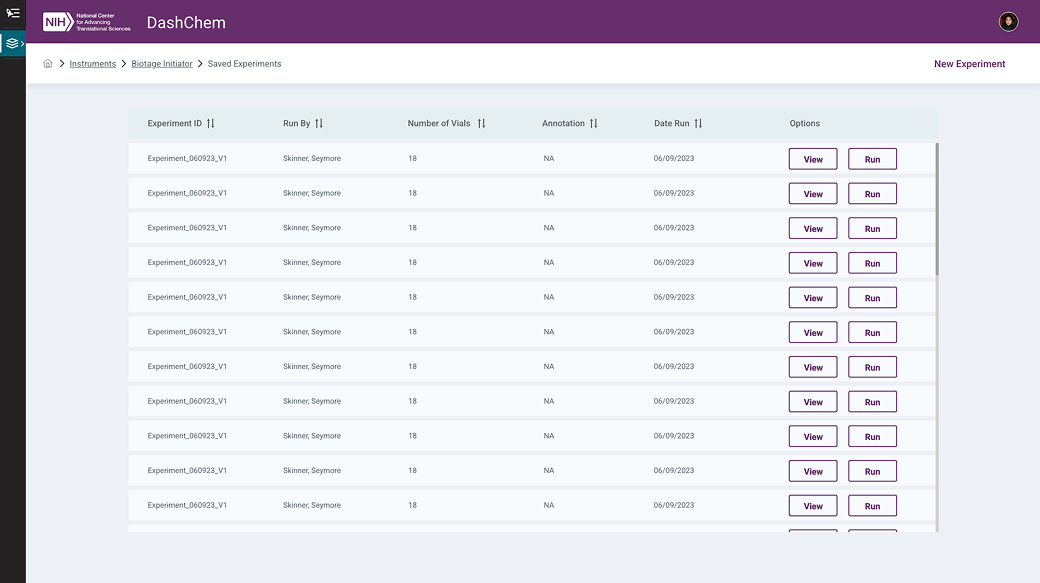
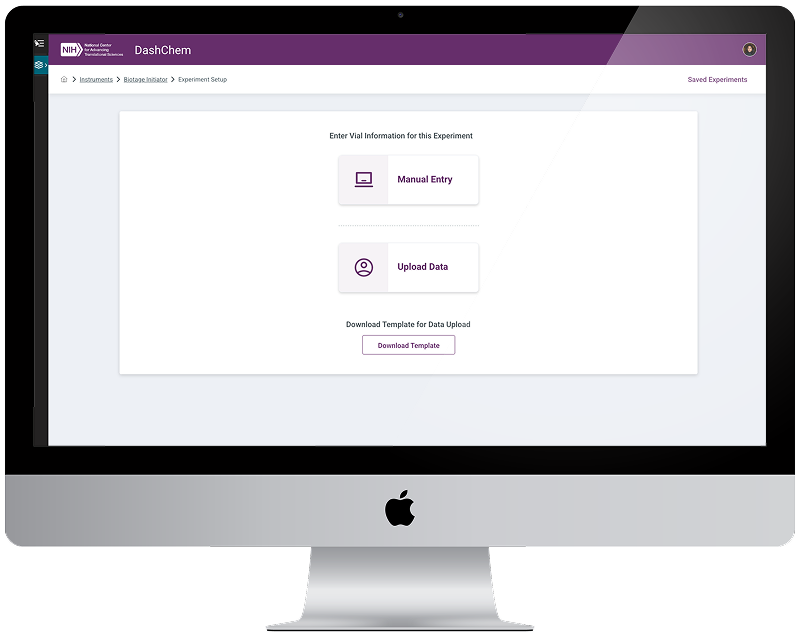
The Biotage V-10 Touch is an evaporation system used to rapidly remove solvents from chemical samples — including high-boiling-point solvents such as DMF and DMSO. It uses vacuum pressure, controlled heating, and vial rotation to accelerate evaporation and reduce manual handling, supporting both standalone use and integration with automated workflows.
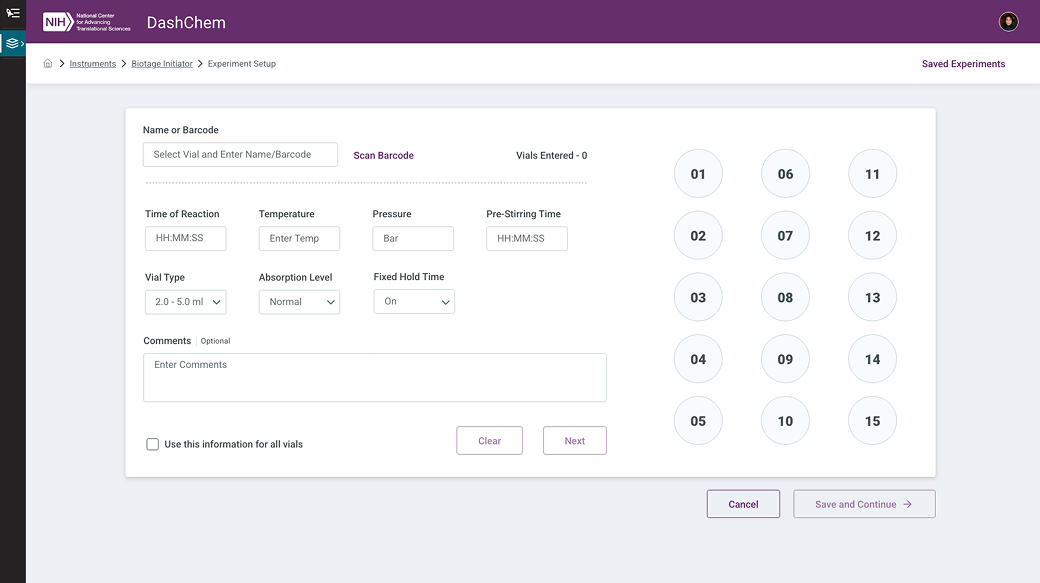
Integrating the Biotage V-10 into ASPIRE's DashChem platform required balancing precise technical control with clear, accessible UI. The design needed to support configuration of solvent type, volume, and flow settings while filtering out incompatible options to prevent user error.
Design Challenges
Manual Step Flagging
Certain evaporation steps require physical lab intervention. The UI needed to clearly surface these manual steps with contextual instructions and visual cues at the right moments in the workflow.
Real-Time Feedback
Scientists needed live visibility into evaporation status and safety alerts — without the interface becoming cluttered or alarming during normal operation.
Template-Driven Efficiency
Pre-filled templates, smart defaults, and contextual tooltips were incorporated to reduce setup effort and improve run-to-run consistency for recurring workflows.
Screens
Interactive Prototype
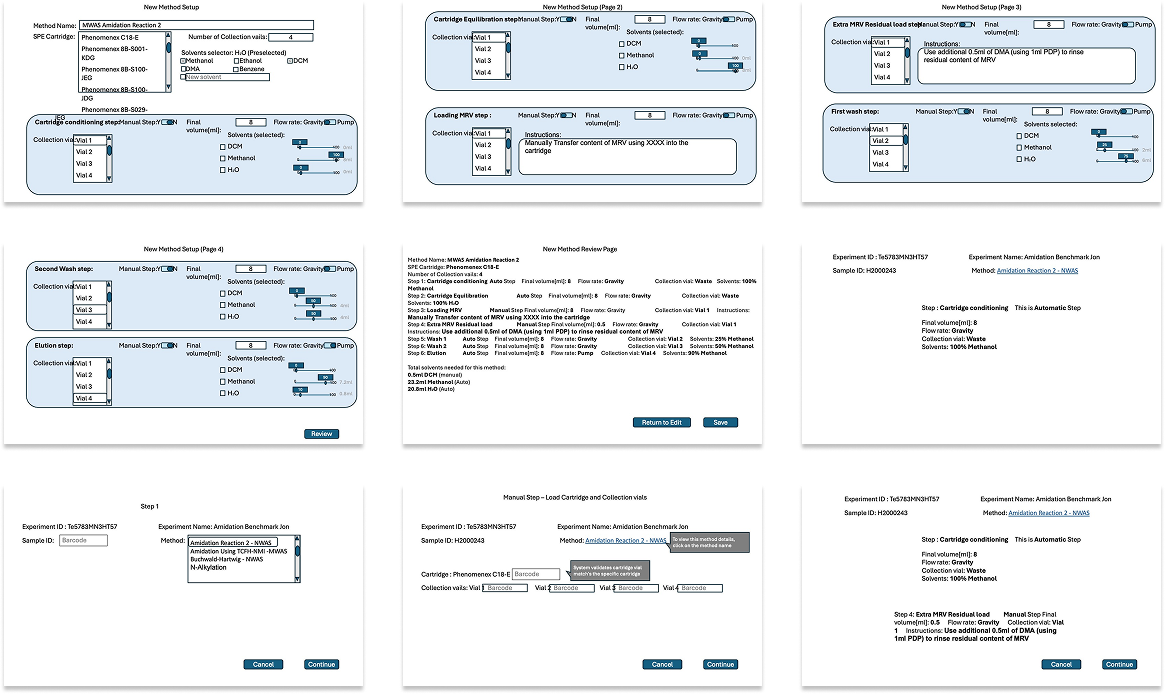
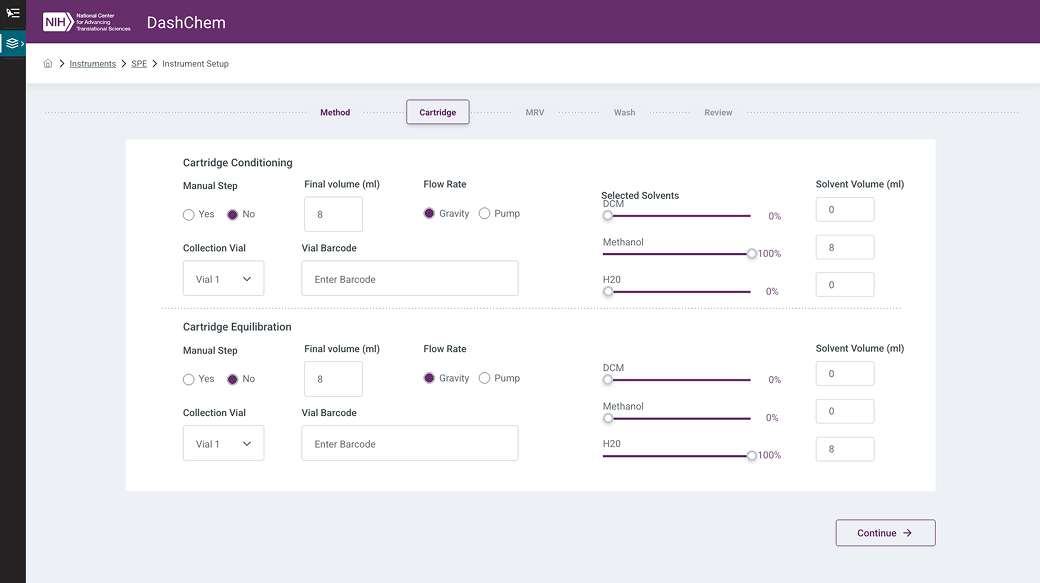
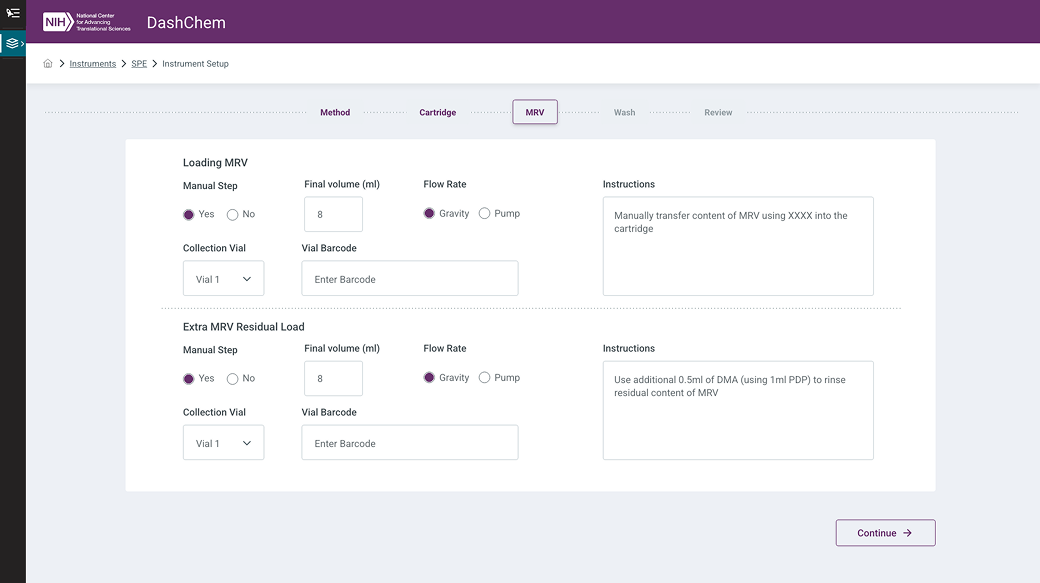
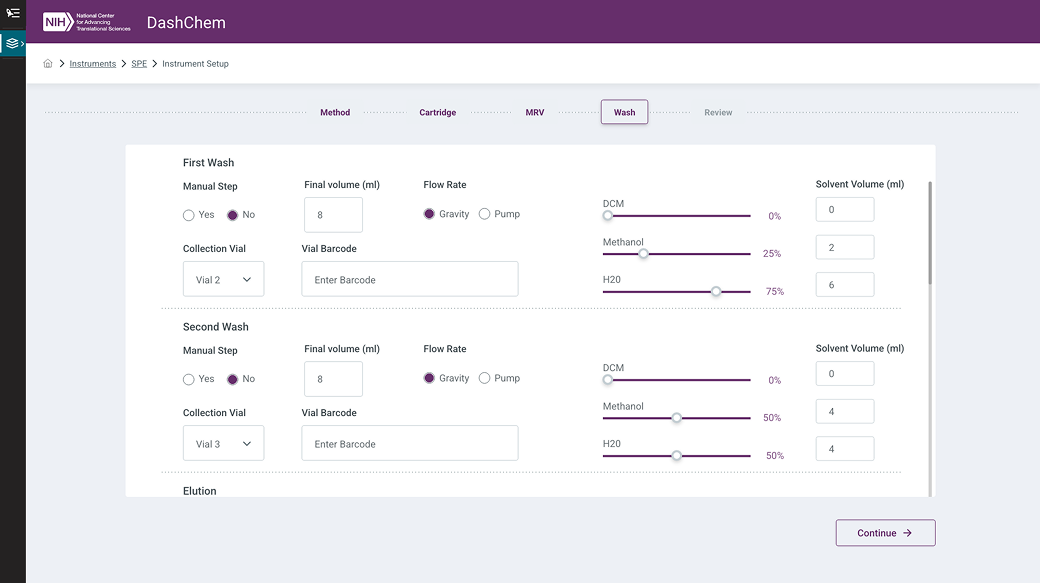
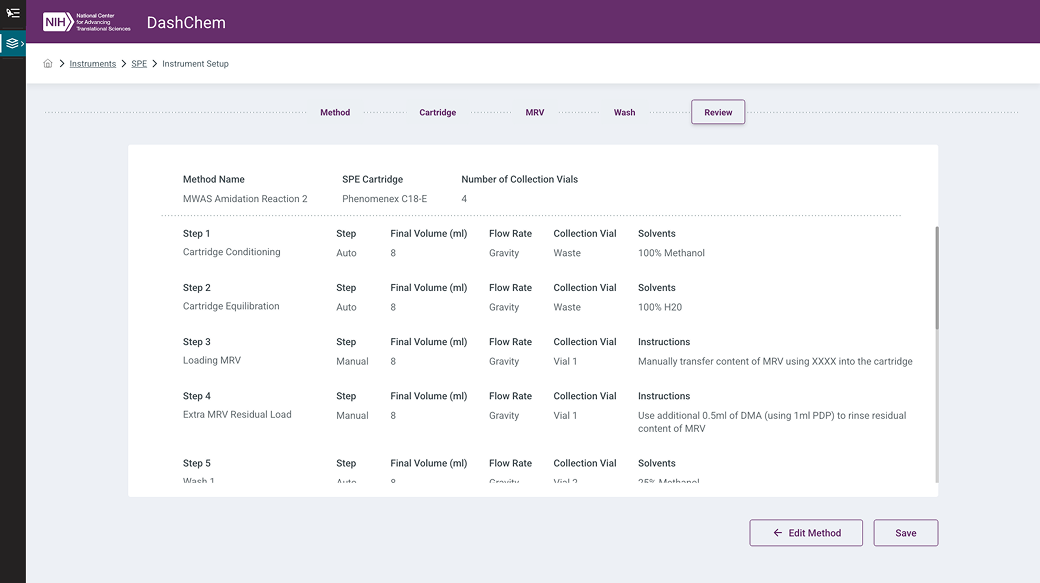
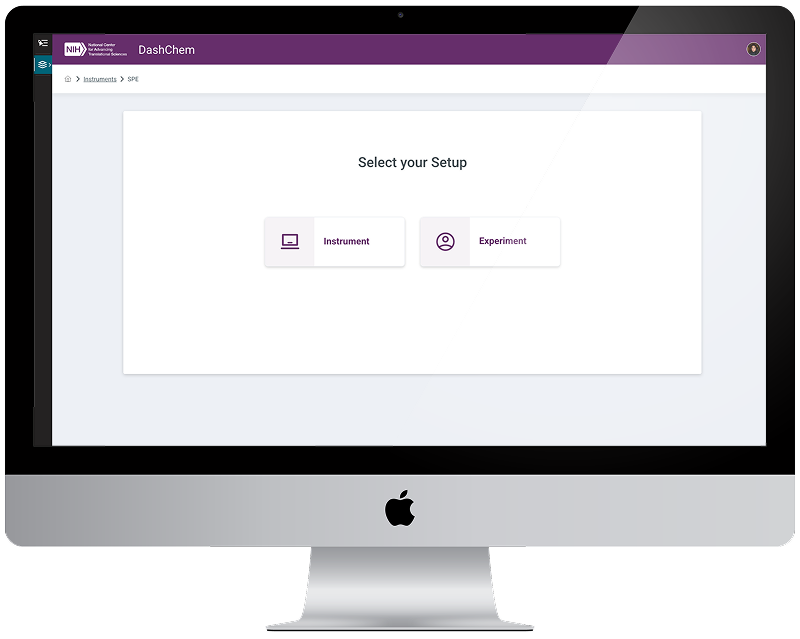
The Solid Phase Extraction (SPE) interface was designed to support chemists conducting semi-automated purification workflows within DashChem. The interface guides users through the complete SPE process — from configuring cartridges and solvents to managing manual steps — ensuring clarity, consistency, and ease of use at every stage.
Scientists can create and execute methods involving precise solvent gradients, flow rates, and vial collection setups, while receiving clear notification of manual actions required during the protocol. Integrated solvent inventory tracking and logging reduce lab friction and help maintain compliance.
"By blending automation with hands-on control, this SPE module exemplifies DashChem's goal of empowering researchers with tools that are both intelligent and intuitive."
Design Approach
- Guided Workflow — Step-by-step flow from cartridge and solvent configuration through method execution, with persistent status indicators keeping users oriented.
- Manual Step Notifications — Clear, contextual interruptions at points requiring physical lab intervention — visually distinct from automated steps to prevent confusion.
- Solvent Inventory Integration — Live solvent availability surfaced directly in the method configuration UI, reducing the risk of starting a run without sufficient materials.
- Logging & Compliance — Automatic activity logging tied to executed methods, supporting research documentation and audit requirements.
Source Documents
Screens

Interactive Prototype
Designing Without a Safety Net of Metrics
ASPIRE was unlike most product design engagements in one important way: there were no formal KPIs. Success wasn't measured against a dashboard or a conversion funnel — it was measured by whether the tools worked for the scientists using them, or didn't. That binary clarity was both liberating and demanding.
It pushed the design process toward something more honest. With no metric to optimize for, the focus landed squarely on the actual user — a chemist trying to register a reaction, log an experiment, or run a purification without the software getting in the way. The prototype reviews with NIH scientists became the ground truth, and designing for those moments sharpened every decision.
Key Takeaways
- Scientists are expert users with zero tolerance for ambiguity. Vague UI is a blocker for someone who needs to execute a precise workflow in a lab environment. Every label, tooltip, and state needed to be unambiguous.
- Prototypes over documentation. For this user base, clicking through a realistic interface generated more actionable feedback in 30 minutes than written specifications could in days.
- Cross-application consistency is a feature. When users move between DashChem, ASPIRE Inventory, and AICP to accomplish a single goal, a mismatched pattern isn't a cosmetic issue — it's a cognitive interruption in the middle of their work.
- Starting from rough outlines builds trust. Translating a stakeholder's PowerPoint sketch into a working prototype is a collaborative act. It signals that the design process serves the team's goals, not the other way around.